CO2 Laser Cutting and Engraving Machine in Pakistan: A Practical Buyer’s Guide
Buying a laser machine is a big decision. The right one can pay for itself through steady orders; the wrong one sits idle because it is too small, too weak or too hard to maintain. Many buyers in Pakistan compare machines only by price, then find out later that bed size, laser tube and support mattered far more.
This guide walks through what a CO₂ laser does, which materials it suits, how to match a machine to your work, and what to check before you pay. It is written for workshop owners, signage makers, gift shops and anyone planning to start a laser-based business.
What a CO₂ Laser Machine Actually Does
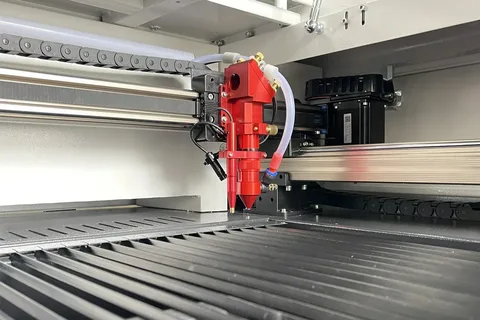
A CO₂ laser cutting machine uses a sealed glass tube filled with gas to produce an invisible beam. Mirrors and a lens focus that beam on a very small point. Used at lower power and higher speed, it engraves: it marks the surface without going through. Used at higher power and lower speed, it cuts all the way through the material.
Because it works from a digital file, the machine repeats the same design again and again with consistent results. That makes it useful for both one-off custom pieces and small production runs.
Materials You Can Work With
CO₂ lasers work best on non-metal materials. Common choices include:
- Wood and MDF: name plates, frames, models, decorative panels
- Acrylic: signage, letters, keychains, displays, awards
- Leather: wallets, patches, card holders, journal covers
- Paper and cardboard: invitations, packaging prototypes, stencils
- Fabric: patterns, appliqué pieces and cut-outs
- Glass and ceramic: surface engraving, though not cutting
One limit is worth stating clearly: a standard CO₂ laser does not cut bare metal. If your main work is metal, you need a different technology, which we cover later in this guide.
Also avoid PVC and vinyl-type plastics in a laser. They release harmful fumes and can damage the machine. When unsure about a material, check its safety data first.
Choose the Right Working Area
Working area is the single most important choice, because you cannot make a piece larger than the bed. Buy for the work you expect in the next two or three years, not only for the first order.
| Model | Working Area | Typical Use |
| M3020 | 300 x 200 mm | Small gifts, keychains, hobby work |
| M4040 | 400 x 400 mm | Gifts, small signage, coasters |
| M500 | 300 x 500 mm | Narrow, longer items and general workshop use |
| M4060 | 400 x 600 mm | Signage, frames, acrylic panels |
| X900C | 600 x 900 mm | Medium signage, larger panels |
| CM1490 | 1400 x 900 mm | Large sheets, furniture parts, production |
| CM1410 | 1400 x 1000 mm | Large-format sheets and heavier workloads |
| F1325 | 1300 x 2500 mm | Full-sheet cutting, industrial workshops |
The table below shows how the Redsail range at TMC Tech is sized, with typical uses.
A useful rule: if most of your orders are smaller than a sheet of A4 paper, a compact bed is enough. If you work with standard acrylic or MDF sheets and want to cut them without trimming first, move to a larger bed. A bigger machine also needs more floor space, so measure your room, door width and power supply before deciding.
Understand the Laser Tube
The tube is the heart of the machine and the part most likely to need replacing. It has a limited working life, and its power affects how thick a material you can cut and how fast you can work.
Higher power does not automatically mean better. A stronger tube suits thicker acrylic and wood and faster cutting, but it costs more to buy and to replace. For small engraving jobs, extra power can go unused. Match the tube to your thickest regular material, then leave a little room for growth.
Before buying, ask three things: which tube brand comes with the machine, how long a replacement takes to arrive, and whether spare tubes are stocked locally. TMC Tech lists replacement laser tubes including RECI and SPT options, so you can check availability before committing. A machine without easy access to spares can lose weeks of work.
Think About Speed and Accuracy
Two machines with the same bed size can still behave differently. Look at:
- Motion system: smooth rails and a solid frame reduce vibration, which keeps fine engraving sharp.
- Controller and software: an easy panel and common software support make daily work faster and training simpler.
- Focus method: manual focus is fine for flat items, while auto-focus helps if you change material thickness often.
- Repeatability: the machine should return to the same position every time, so batch jobs match.
If you can, see the machine working on your own material before you buy. A short demo tells you more than a long specification sheet.
Plan the Supporting Equipment
A laser machine is rarely a plug-in-and-go purchase. Plan for the following from the start:
- Cooling: most CO₂ tubes are water-cooled, so a chiller or a proper water circulation setup protects the tube from overheating.
- Exhaust and ventilation: cutting wood, acrylic and leather produces smoke and odour. A good exhaust fan and duct keep the air clean and the lens clear.
- Stable power: voltage fluctuation can shorten the life of electronics. A stabiliser is a sensible, low-cost safeguard.
- Air assist: blowing air at the cutting point gives cleaner edges and reduces flare-ups.
- A flat, sturdy surface: the machine should sit level and away from heavy vibration.
Include these costs in your budget. Buyers who forget them often feel the machine costs more than expected, when the real issue is an incomplete plan.
Compare Total Cost, Not Only the Price Tag
The purchase price is only the first cost. Over time you will also spend on:
- Replacement tubes, lenses and mirrors
- Electricity and cooling
- Materials and test pieces while you learn
- Software, if you choose a paid option
- Servicing and repairs
A lower price with weak support often ends up costing more than a fairly priced machine from a supplier that offers installation, training and quick spares. When you request a quote, ask exactly what is included: tube, chiller, exhaust, software, warranty and training.
CO₂ Laser or Fiber Laser?
This is a common point of confusion, so it is worth being direct.
- CO₂ laser: best for wood, acrylic, leather, paper, fabric and similar materials. It cuts and engraves them well.
- Fiber laser: best for marking metals such as steel, aluminium and brass, and for plastics that respond to it. It is mainly used for marking, serial numbers, logos and tags.
If your work is mostly non-metal, a CO₂ machine is the right fit. If you need to mark metal parts, tools or jewellery, look at a fiber laser marking machine instead. Some workshops eventually own both, using each for what it does best.
Safety Basics You Should Not Skip
A laser is a safe, productive tool when handled properly, and a hazard when it is not. Keep these habits from day one:
- Never leave a running machine unattended, since materials can catch fire.
- Keep a fire extinguisher close to the machine.
- Do not open the lid or bypass safety interlocks while the laser is firing.
- Use only materials known to be safe for laser use.
- Keep the machine, lens and rails clean, because dirt causes poor cuts and heat build-up.
Train every operator before they use the machine alone.
A Quick Checklist Before You Buy
Before paying for any laser machine, make sure you can answer yes to these:
- Does the bed fit the largest piece I expect to make?
- Do I know the tube brand, its approximate life and replacement cost?
- Is a chiller, exhaust and stabiliser included or budgeted?
- Will the supplier install the machine and train me?
- Are spare parts available locally, and how fast can they arrive?
- Have I seen the machine cut or engrave my own material?
- Is the warranty clear and in writing?
If any answer is no, ask more questions before you commit.
Final Thoughts
The best laser cutting machine in Pakistan is not the biggest or the cheapest. It is the one that fits your materials, your space and your customers, and comes with support you can rely on after the sale. Start from your work, choose the bed size and tube to match, and plan the supporting equipment before you order.
FAQ’s
Can a CO₂ laser cut metal?
Not bare metal. It is designed for non-metals. For metal marking, a fiber laser is the better choice.
How long does a laser tube last?
It depends on the tube, how hard it is used and how well it is cooled. Good cooling and moderate power settings extend its life.
Do I need a chiller?
If your machine uses a water-cooled tube, yes. Cooling protects the tube and keeps cuts consistent.
Is a bigger machine always better?
No. A larger bed costs more and needs more space. Choose the size that matches your real orders.
Can beginners use these machines?
Yes. With basic training, test pieces and careful safety habits, most people learn the essentials within a few weeks.


Comments